The Manual Process
Until recently my job search has looked something like this:
- Go to job sites like rubyonremote, LinkedIn, or doing a Google search on a job board site like Greenhouse.
- Comb through the job listings and throw out the ones where I want to disqualify them (aka I would need to move) or they are asking for something that disqualifies me.
- Out of the job listings that are left, review each one in detail and rank each one in terms of fit and interest.
- For each of these jobs, add a task in my Kanban board in Todoist.
- Start the application process.
This might not seem like a lot of steps but there is a lot of manual work in the first three steps and I had been doing it manually for way too long. So I decided to automate it.
The Automation
There is still more refinements to come but I’ve pretty happy with the first release. I start by funneling jobs to my email inbox where I label them with Job Leads/<provider-name> where the provider name is something like rubyonremote, linkedin, or google-alert.
The agent here doesn’t really matter all that much. They are all pretty much equivalent nowadays. That said, I opted to use Claude Cowork to drive everything. Before I can tell Claude what to do, I need to setup a couple of things. I create a directory on my local machine with the name of claude-jobs. This is used to store job listings as a permanent record and to prevent duplicates. I could use a SQLite database for this but I wanted to keep things as lightweight as possible for the first iteration. Inside this directory, I have subdirectory titled profile. This directory houses my resume, recommendations from LinkedIn, and any reviews from peers that I have worked with in OKF (Open Knowledge Format).
I connect Claude Cowork to both Gmail and Todoist so that it can read emails with the labels I define and the ability to create tasks in Todoist. I then created a prompt in Cowork to do the following:
- Read the latest email for each defined label.
- For each job listing do a web search for that company and job title.
- If the search succeeds to the following:
- Get the content and save it to the directory. The file format is
<provider-name>-<job-title>-<job-id>-<yyyymmdd>-<hhmmss>.md. - Score the job according to my resume, recommendations, and peer reviews and record that in the frontmatter for the markdown file. A reason for the score is also generated.
- Create a task in Todoist in the
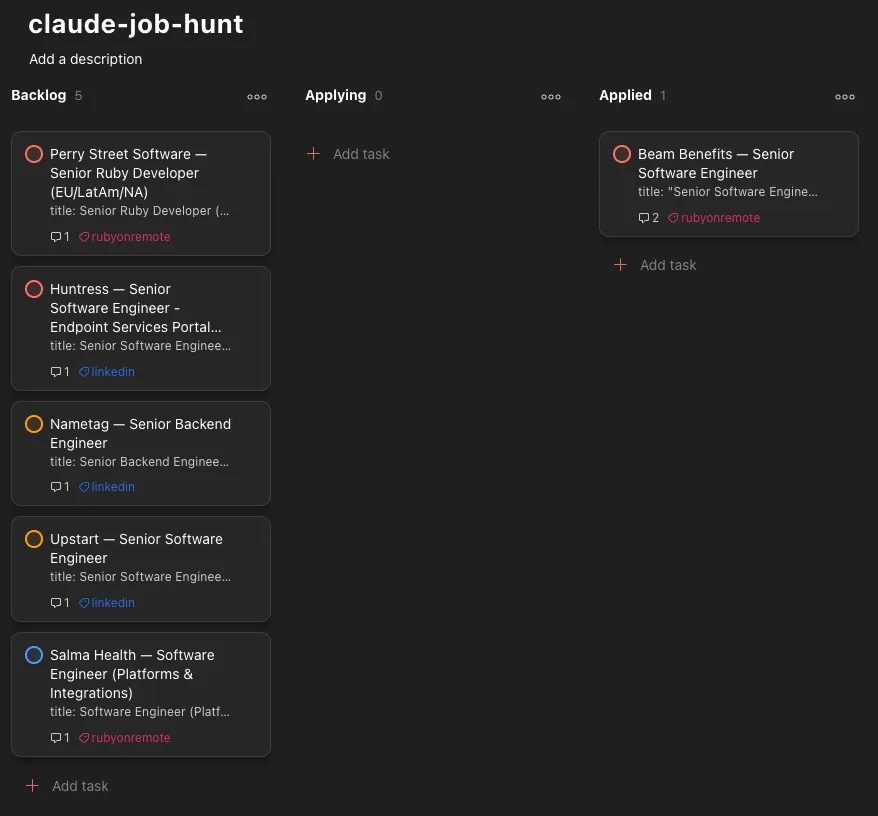
Backlogcolumn. If I’m disqualified, in any way shape or form the task gets moved to theDisqualifiedcolumn. - Label the task with the provider name in Todoist.
- Set the priority according to the fit score that was assigned.
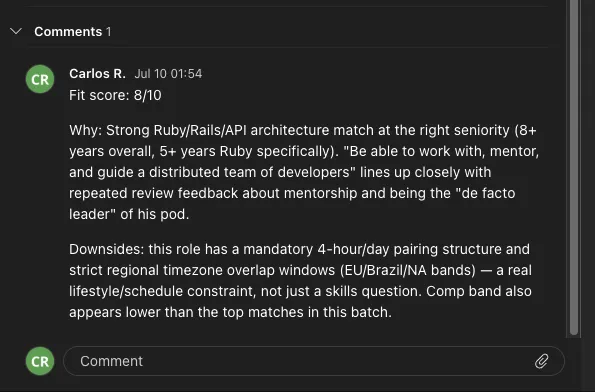
- Add a comment to the task adding the fit score and reason as a comment.
- Get the content and save it to the directory. The file format is
- If the search fails for some reason do the following:
- Create a stub and save it to the directory (so that it’s not re-tried).
- Create a task in Todoist in the
Manual Interventioncolumn.
- Then I set it as a recurring task.
The frontmatter for the Markdown files looks something like the following:
---
title: Senior Software Engineer
company: EasyPost
source_url: https://www.linkedin.com/jobs/view/4438553308
retrieved_from: https://builtin.com/job/senior-software-engineer/8484913
date_created: 2026-07-10
fit_score: 8
fit_notes: "Explicit Ruby on Rails and Python proficiency requirement matches directly, and the 8+ years seniority bar fits well. Degree language reads as flexible (\"8+ years... or equivalent related work experience\"). Go is a plus rather than required, softening the language-shift concern. Strong comp ($150k-$200k), fully remote."
---
Some Caveats
Searching Instead of Direct Access
You might be asking yourself “Why are you having the agent search for the job instead of just following links directly?” and that’s a great question. The answer is simple, autonomous agents get blocked often and I didn’t want to pay for a scraping service for the first version.
Why OKF?
Yes, I could have gone full RAG (Retrieval-Augmented Generation) here instead of OKF but that would have been yak shaving. It would have been super fun to do but didn’t get me close to accomplishing my goal.
Security
The first prototype (shown in the screenshots below) of this was simply using OAuth scopes for Gmail for my primary email and the MCP server connector for Todoist. This is NOT secure as it violates the Principle of Least Privilege. The principle states that user accounts or processes should only be given the privilege to do their task and nothing more. Giving the agent access to my entire primary email account through OAuth scopes is definitely a no-no. Also giving the agent full access to my Todoist account to create entries, comment on them, and potentially move them is again a no-no.
Once I validated my results with the prototype, I tightened things down by creating a separate Gmail account that is only used for receiving job postings. It does nothing else. In regards to Todoist, I invited the newly created Gmail account as a guest to the specific project. The guest account, doesn’t have access to any other project and cannot create projects, change team settings, or manage billing settings. It’s locked down to only the things it needs access to and nothing more.
Results
Kanban Board
Job Detail