tldr;
Fargate is a small private site where my friends sign in and open files I’ve published. The app is TypeScript with Hono, uses Bun on my machine, and runs on Node in AWS Lambda. This is part one of the series. If you missed it, the prelude covers why I built it and how the pieces fit together.
Why TypeScript when I’m a Ruby person?
Ruby is still my language of choice and if I were writing this code day to day, I’d have reached for Sinatra or Roda. But I wasn’t going to be the one writing most of it. An agent writes the code and I review every change through a pull request. Once that’s the arrangement, my fluency in the language matters less than how well the language fits where the code runs.
That pointed to Hono. Its middleware made the sign-in check a few lines, its JSX renders HTML on the server with no frontend build step, and the same app runs locally on Bun and in production on Lambda. Tabs, filtering, sorting, and previews use htmx loaded as a plain script.
Bun on my machine, Node in production
Bun is the whole local toolchain. It installs packages, runs tests, bundles the app, and runs scripts:
"scripts": {
  "dev": "bun --watch src/server.ts",
  "dev:sample": "bun --watch scripts/dev-sample.ts",
  "test": "bun test",
  "typecheck": "tsc --noEmit",
  "build": "bun build src/lambda.ts --target=node --format=esm --outfile=dist/index.mjs",
  "smoke": "node scripts/smoke.mjs",
  "publish": "bun scripts/publish.ts",
  "unpublish": "bun scripts/unpublish.ts"
}
Lambda doesn’t run Bun though. It runs the bundle on Node. So there’s one hard rule for the app code. It can use web-standard and Node APIs, and never anything under Bun.*. I didn’t want to rely on me or the agent remembering that, so a test checks for it:
// ADR 0001: Lambda runs the bundle on Node, so app code can't use Bun.* APIs.
// The Node smoke run catches this too, but only on the routes it hits.
test("app code uses no Bun.* APIs", () => {
  const srcDir = join(import.meta.dir, "..", "src");
  const offenders = readdirSync(srcDir, { recursive: true, encoding: "utf8" })
    .filter((file) => /\.tsx?$/.test(file))
    .filter((file) => /\bBun\./.test(readFileSync(join(srcDir, file), "utf8")));

  expect(offenders).toEqual([]);
});
It’s a blunt instrument, but it works. The second line of defense is a smoke run. bun run smoke loads the built bundle under Node, the same way Lambda does, and fires a handful of requests at it. The welcome page should return a 200, a protected page should return a 403 without a sign-in token, the stylesheet should actually be in the bundle, and the pixel font’s bytes should survive bundling. CI runs it on every pull request and again before every deploy.
You might be wondering why I didn’t just use Node everywhere. I considered it. I kept Bun because one tool doing install, test, bundle, and scripts is really nice.
One app, two front doors
The app itself is built once in src/app.tsx and there are two tiny entry points. One for Lambda:
import { handle } from "@hono/aws-lambda";
import { createApp } from "./app";
import { loadConfig } from "./config";

// Config is read when Lambda loads the module, so a bad setting fails the
// cold start instead of a request.
export const handler = handle(createApp({ config: loadConfig(process.env) }));
And one for my machine:
import { serve } from "@hono/node-server";
import { createApp } from "./app";
import { loadConfig } from "./config";

const config = loadConfig(process.env);
const app = createApp({ config });
// Not 3000, which Rails and many other local servers use.
const port = Number(process.env.PORT ?? 4280);

serve({ fetch: app.fetch, port }, (info) => {
  console.log(`Fargate listening on http://localhost:${info.port} (AUTH_MODE=${config.authMode})`);
});
Yes, I picked a port that doesn’t fight with Rails. Old habits.
The bucket is the database
There’s no database and no manifest file. The app lists the bucket and works everything out from the keys.
The first folder in a key is the Collection, and the filename becomes the Title a friend sees. So ttrpg/mothership/warden.pdf shows up in the TTRPG Collection with a sub-path of mothership/. Hyphens become spaces, words get capitalized, and a short list of acronyms stays uppercase so ttrpg doesn’t turn into “Ttrpg”.
// Words that stay uppercase in Titles and Collection names. Compared without
// regard to case.
const ACRONYMS = ["BGA", "TTRPG", "RPG", "D&D"];
When one of my friends opens a file, the app makes a short-lived link for that one exact file and sends them to it. The file comes straight from S3 to their browser and never passes through the app. Links are made on demand and never written to the logs.
HTML guides get special treatment. A link expires, so if I sent you straight to one and you bookmarked it, the bookmark would be dead in a few minutes. Instead, HTML files open in a viewer page on the site that wraps a fresh link every time it loads. Refresh it or bookmark it and it keeps working.
The dashboard
The dashboard is a single list of every file, newest first, with tabs for each Collection, a filter box, and a sort menu.
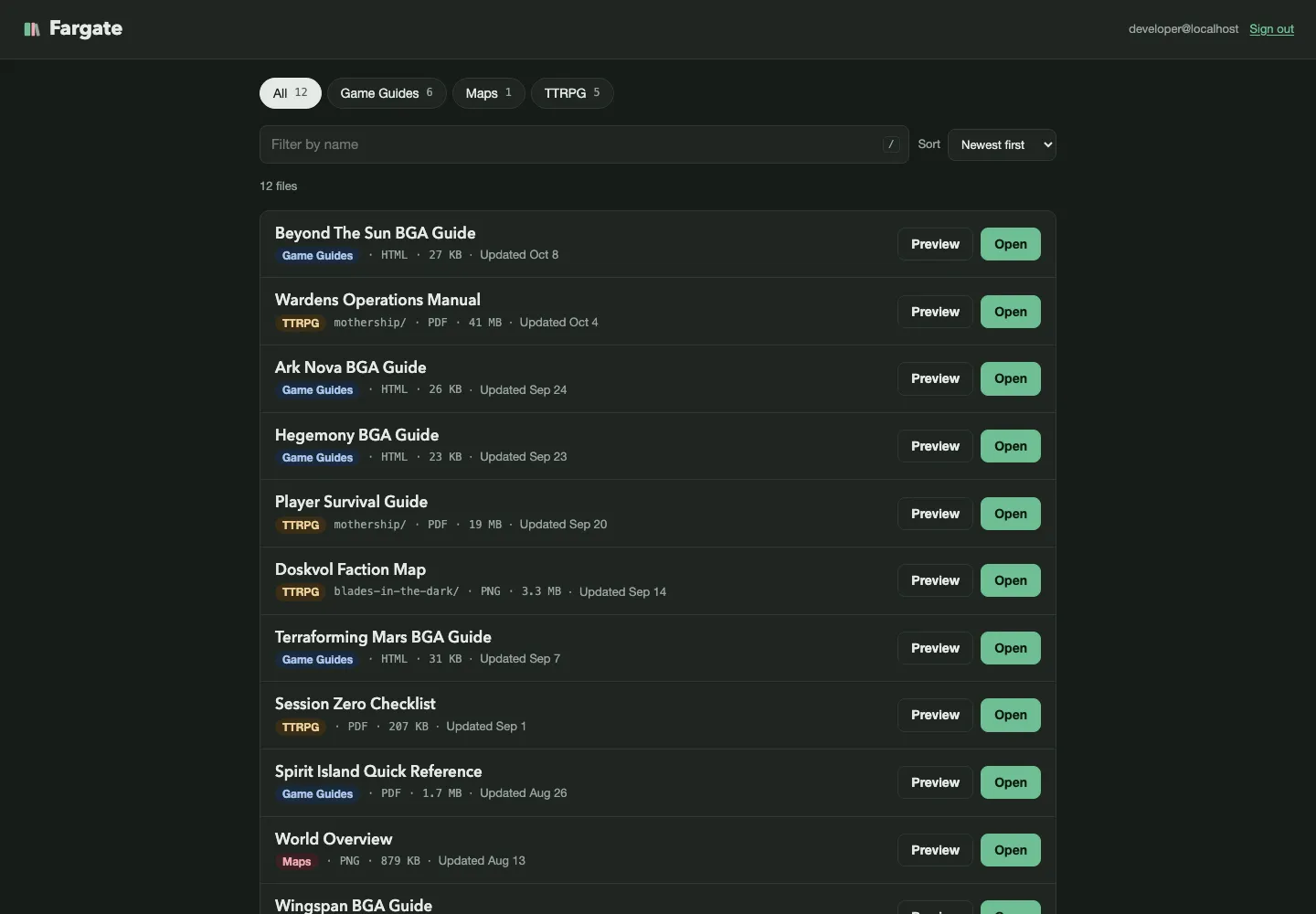
The tabs, filter, and sort all use htmx to swap just the list and update the URL, so something like /library?collection=ttrpg&q=ark&sort=name is a real page you can bookmark or reload. One detail I really like is how it treats the browser’s history:
// Typing in the filter replaces the history entry, so Back skips
// keystrokes. Tabs and sort add one.
const historyHeader = context.req.header("HX-Trigger-Name") === "q" ? "HX-Replace-Url" : "HX-Push-Url";
Without that, typing “ark nova” into the filter and hitting Back would walk you back one letter at a time. It’s a small thing, but I notice every time an app gets it wrong.
Working without AWS
The screenshot above isn’t my real bucket. It comes from bun run dev:sample, which runs the app against a fake bucket of sample files held in memory. Links point at a fake S3 endpoint on the same local server that serves generated content like an HTML guide, a one-page PDF, and a placeholder image. It even expires links the way S3 does.
There are a few knobs too. SAMPLE_BUCKET=empty shows an empty bucket, SAMPLE_BUCKET=down makes every S3 request fail so I can see the error page, and LINK_TTL_SECONDS=20 makes links expire fast enough to test. It meant I could build and review the whole dashboard before the real bucket existed.
Publishing
Publishing is a script:
bun run publish "Ark Nova Guide.html" "game guides"That uploads the file to game-guides/ark-nova-guide.html with the right content type and prints the Title my friends will see. A Collection that doesn’t exist yet needs --new, so a typo can’t quietly create a new tab on everyone’s dashboard. Publishing a file with the same name replaces it and bumps it to the top of the list.
A fun gotcha: it has to be bun run publish and not bun publish. The latter is Bun’s command for publishing a package to npm, which is very much not what I want. 😅
There’s also a /publish Claude Code skill that wraps both scripts, so “publish ark-nova.html to game guides” is all I have to type. The skill only uses those scripts and asks me to confirm before it deletes anything.
The welcome page
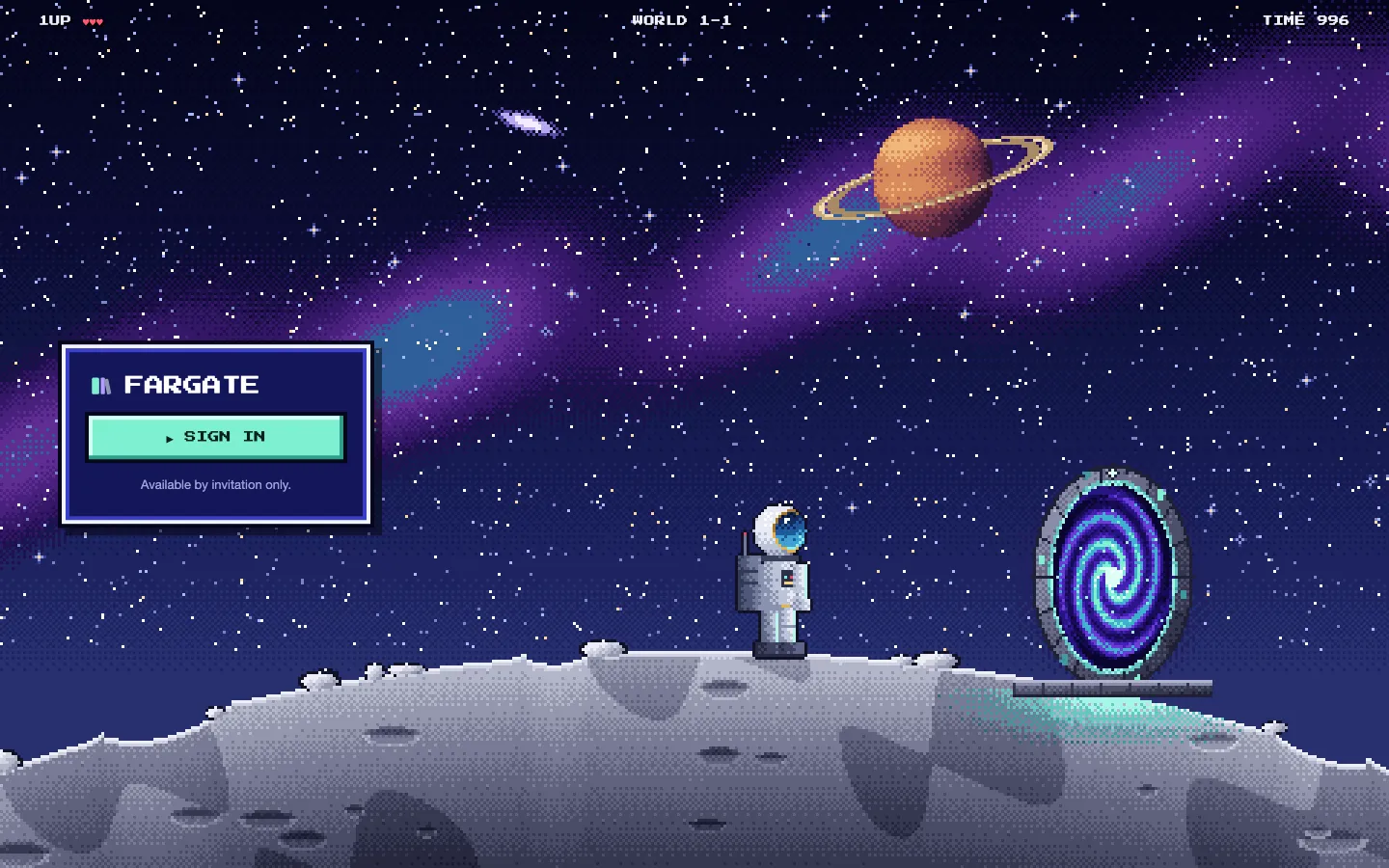
The welcome page is the one public page. It’s a side-scroller scene drawn on a canvas at low resolution and scaled up with hard pixel edges, complete with dithered sky, a ringed planet, a HUD along the top, and a portal with a swirling vortex. If your system is set to reduce motion it draws a single still frame instead.
It deliberately says nothing about what’s on the site or how sign-in works. There’s the name, a Sign in button, and “Available by invitation only.” That’s it. The reason it exists at all comes down to Cloudflare, which I’ll get to in part three.
Coming up
The app is only half the story. In the next article I’ll go over how the infrastructure is managed with Terraform, including why it runs on Lambda instead of Render or, well, Fargate.